Ask AI a question about your data
Outcome: complete this walkthrough and you will have asked a natural-language question and got a live SQL-generated answer with a result table you can export · Time: ~2 min active · ~3 min elapsed (waits included)
Before you start
-
Role: viewer or higher
-
You have a demo-tenant account (viewer role is enough to ask)
- Your catalog has tables (the demo has ecommerce.public.orders)
- A little credit balance — Ask AI meters LLM tokens + DuckDB seconds (tiny per question)
Steps
1. Open Ask AI
Click Ask AI in the top bar (star icon).
Locator: Ask AI (top bar)
-
You should see: The Ask AI panel slides in: a MODEL selector (deepseek.v3.2), suggested questions, and an input box.
-
If not: Panel won't open → your account may be out of credits (Ask AI is metered).
2. Ask a question
Click the suggestion Count orders by status — it fills the input — then press the send (↑) button.
Locator: suggestion chip + ↑ send
-
You should see: The question appears in the conversation and Ask AI shows Thinking… while it generates and runs SQL.
-
If not: If the ↑ is disabled, type the question manually and press Enter.
3. Read the answer
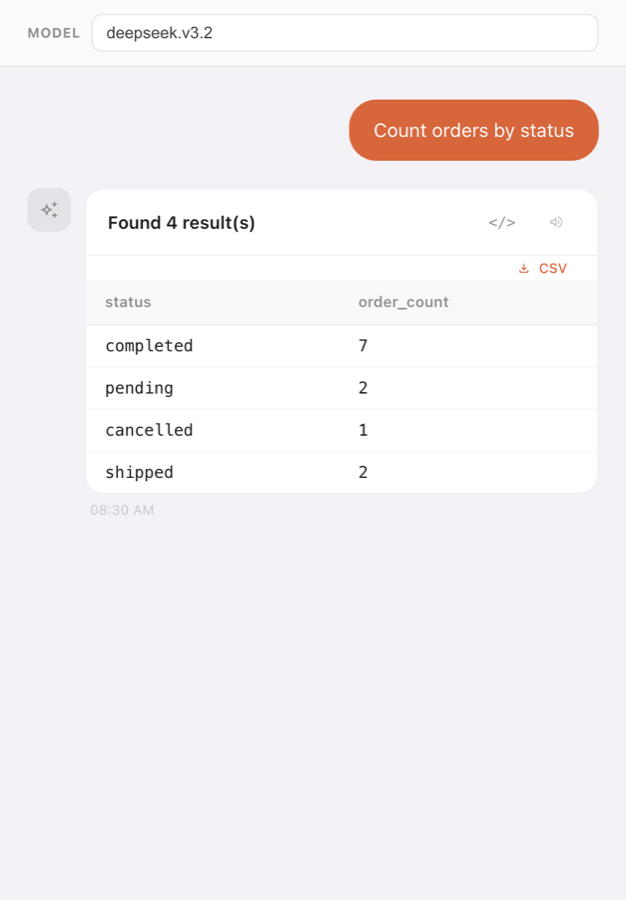
Wait for the result card.
Locator: result card (Found N result(s))
-
You should see: Found 4 result(s) with a table: completed 7 · pending 2 · cancelled 1 · shipped 2. A CSV download and Read aloud button are available.
-
If not: An error appears → if it mentions credits, top up; if it's a product error, note the exact text and page the platform owner.
4. See the SQL it wrote
Click the </> button on the result card to reveal the generated SQL.
Locator: </> button
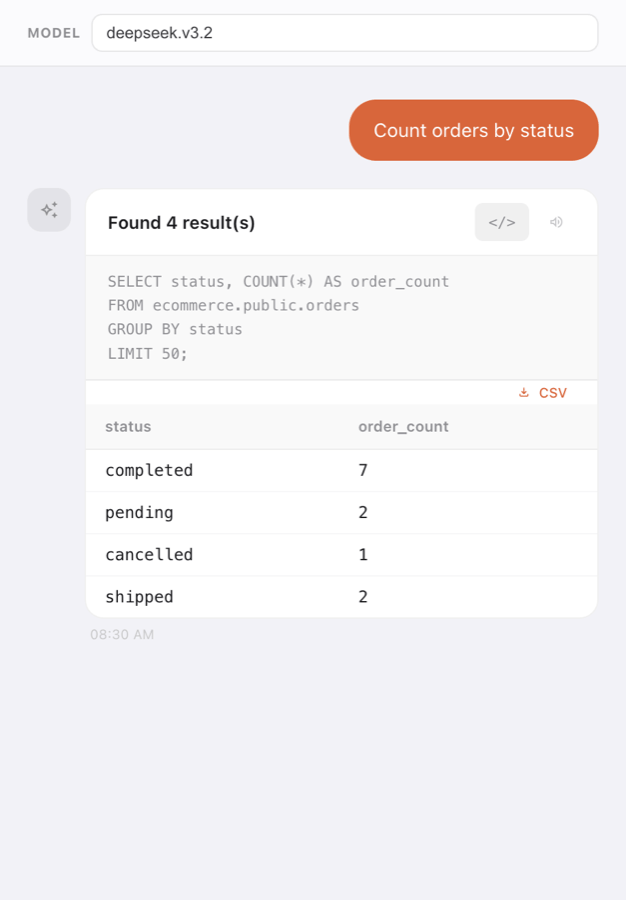
- You should see: SELECT status, COUNT(*) AS order_count FROM ecommerce.public.orders GROUP BY status LIMIT 50; — you can copy it or export the results as CSV.
Expected result
When the steps are done:
- model:
deepseek.v3.2 - question:
Count orders by status - rows:
4 - result:
completed 7 · pending 2 · cancelled 1 · shipped 2 - generatedSql:
SELECT status, COUNT(*) AS order_count FROM ecommerce.public.orders GROUP BY status LIMIT 50; - measuredOn:
2026-09-03
Start over & leftovers
Nothing is written to storage — Ask AI only reads your catalog and returns results. Your question appears in the Ask AI conversation history for your user (dismissible by clearing/starting a new chat).
Try variations
- Try the other suggestions: 'Show me top customers by lifetime value', 'Find customers with no orders', 'Show monthly revenue trend'.
- Ask your own question in plain language (e.g. 'how many products cost more than 20?').
- Use CSV to download the result as a file.
- Choose a different model from the MODEL selector (per-tenant override).
Terms used
Ask AIMODELdeepseek.v3.2cataloggenerated SQLCSV export
Walkthrough W9-ask-ai · verified against build server v130 + frontend (2026-09-03) · role viewer. Scenario Pack source: walkthroughs/W9-ask-ai/. This page is rendered from scenario.json — edit that, not this.
Results come from the tenant's own demo catalog tables.